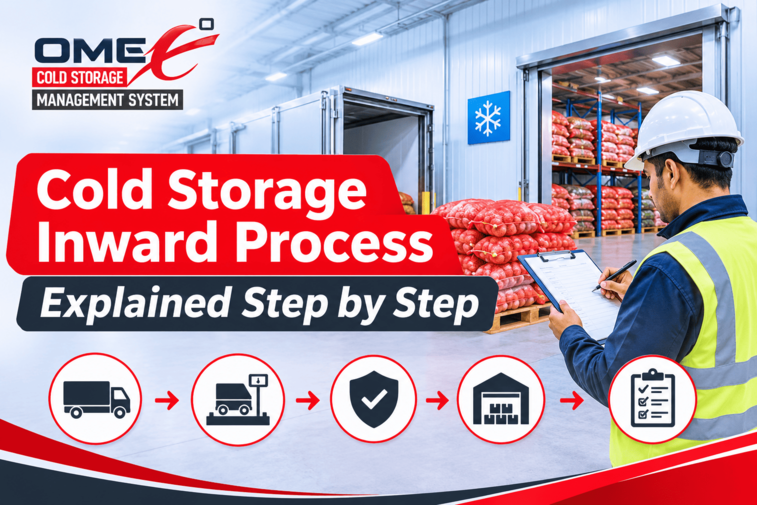
Cold Storage Inward Process Explained Step by Step
One of the most critical operations in a cold storage facility is receiving incoming products. An error made during receiving may lead to numerous issues with your inventory control system, billing problems, misidentified product lots, and/or difficulty when preparing to ship out products.
This is why having an organized cold storage inward process for receiving cold storage items is so important. When you have a systematic way of identifying, checking, weighing, assigning to the correct area, and recording each item as it enters your facility, then you will be able to manage all of the products that are being brought into your facility.
If you work with potatoes, apples, onions, or any other items that are affected by temperature, knowing how each step affects your team’s ability to keep track of inventory and operate your warehouse more effectively will help.
Let’s understand the complete process step by step.
Pre-Inward Entry Before Vehicle Arrival
The internal operations should ideally commence prior to the vehicle’s arrival at the refrigerated warehouse.
The user (customer) or carrier provides key data including the name of the company, what is being shipped, how much will be shipped, license plate number, when the goods are expected to arrive at the destination, and all applicable booking numbers.
Using the information provided above, the Office Team can create a Pre-Inward Entry which will give Warehouse Staff early notice of when goods are arriving and help them prepare for the unloading process, including obtaining enough labor and having sufficient storage space available.
Practical example: If a farmer sends 500 bags of potatoes, the team has the ability to enter in the system what is to be delivered and the customers’ contact information prior to the arrival of the truck. Upon the truck entering the gate, the team will be able to verify that the delivery was booked, rather than collect all of that information again.
Vehicle Gate Entry and Verification
After the car has arrived, the gate staff checks the information on the car’s registration and/or license plate to see if it matches with what was entered in the pre-inward record or deposit application.
Important information includes:
- Vehicle registration number
- Driver or transporter details
- Customer or depositor name
- Arrival date and time
- Pre-inward reference number
The record of each of these facts will create a trail for every vehicle that enters the area.
Managers can also use a digital gate entry system to find out when trucks will be arriving, keep track of where they are going and make sure there isn’t too much chaos at the gates during the peak harvest times.
Vehicle Weighment
The vehicle can go to a scale after it enters through the gate to get its total weight.
The weight of each delivery truck is recorded at the time it unloads its cargo. After all items have been unloaded from the truck, it may then be re-weighed. This will provide a measurement of the net weight of the delivered goods.
The loaded weight of the truck is 18,500 kg. Its empty weight was 6,500 kg. Therefore, the total weight of materials in the truck is 12,000 kg.
When the cost of storage, the cost of labor, or customer invoicing are based upon the weight of a product and not how many bags it is contained in, then there is an added emphasis for accurate weight measurement.
Quality Inspection and Grading
A team at a warehouse must verify that products to be stored are in good working order before they accept them into the warehouse.
Depending on the commodity and business requirements, inspection may cover:
- Physical damage and visible spoilage
- Moisture or excessive wetness
- Product size and uniformity
- Packaging or bag condition
- Signs of pest or disease damage
- Commodity-specific quality parameters
Some facilities also have grading systems to organize products by category based on their quality.
In addition to this, if you are able to record both the weight of a lot of potatoes and the grade of each lot at the time of inward, then when a customer requests that their stock be returned, it will be easier for you to determine whether there were any issues with the quality of the product when it was initially received.
The team must document the issue when a good fails to meet the quality standards. Then, they need to apply the facility’s acceptance, rejection, or segregation policies.
Location Allocation
After inspection, the next step is deciding where the goods should be stored.
The warehouse manager takes into account what kind of product is stored, how much space there is for storing products, what the storage environment is like, what customers need, and where products are currently stored.
A location may be assigned using a hierarchy such as:
Building → Floor → Chamber → Chamber Floor → Rack or Pallet
Goods waiting for a permanent storage location can be held in temporary locations.
With proper allocation of locations for products, you can easily identify your stock when you need to fill an order, and the process of shipping out will be simplified. Rather than having to instruct workers to look throughout various rooms or areas within the facility, the software will provide a precise location of each individual lot.
Final Inward Entry and Lot Creation
The final inward entry is completed once the goods have been put into the appropriate storage area.
All of the information that was obtained from previous steps (i.e., customer data, type of commodity, quantity, weight, grading, inspection results and where the commodity will be stored) is connected at this point.
A unique lot or transaction number allows for identification of goods as they are being stored.
The input record will be the base on which to perform other actions, including ordering materials, moving items from one location to another, processing outward orders, and generating bills for storing items.
Stock Confirmation and Record Verification
The process for receiving incoming items does not stop at the completion of entering data into the system. It continues with verification by employees of the accuracy of the entered quantities versus what has been received, as well as the appropriateness of the assigned storage areas.
At this point, the manager may review reports on inventory, lot information, and all other transactions related to updating inventory properly.
This check can be used as a final verification of the accuracy of your order prior to it being processed for shipping. Using this check, you can determine if there are any discrepancies in your order before they become problematic for you to resolve when the customer calls back asking for their items to be shipped.
How Cold Storage Software Improves the Inward Process
Inward operations management using spreadsheets and registers becomes complicated as many vehicles enter, several customers drop-off products and employees are working in various areas.
Modern Cold Storage Software Features allow all these tasks to be completed in a single process.
The OMEX CSMS handles all aspects of receiving product from a supplier (pre-inward), weighing the received product (weighment), checking the quality of the product (quality inspection), categorizing or grading the product (grading), allocating space in the warehouse to store the product (location allocation) and finally completing the process of storing the product in the warehouse (final inward). Businesses can also automate certain processes within their receiving workflow such as automating the weighing of products, automatically allocating space in the warehouse for products and using QR-codes as part of their receiving workflow.
Cold Storage ERP Features Assist in Eliminating Repeat Data Entry, Tracking Lot History, and Maintaining Better Control Over Inventory
The proper Cold Storage Management System Features also provide connection between in-bound transactions and report on inventory levels, client information, billing and out-bound transactions. This provides management with an enhanced understanding of the overall operations of the warehouse.
Final Thoughts:
The first step in achieving effective cold chain management is a well-managed inward process. The quality of the inward process — which includes vehicle entry, weighing, product inspection, identification of where the product should be stored, and ultimately receiving the product — will determine how accurate your company’s inventory records are.
The Cold Storage Software Modules that are available with a cold storage warehouse software package will allow for a cold storage business to eliminate unorganized paperwork and create a structured flow of work. Regardless of whether you select Cold Storage Software Online and Offline, your goal should be the same; accurate inventories, clear tracking of lots, less operational errors, and improved customer service.
See the cold storage software features offered by OMEX CSMS to understand how technology can simplify your inward operations. understand how technology can simplify your inward operations.
FAQs:
The cold storage inward process is the procedure for receiving goods, verifying vehicle and customer details, weighing materials, inspecting quality, allocating storage locations and recording final stock entries.
Pre-inward entry is the initial registration of expected goods before their arrival. It captures customer details, commodity type, expected quantity, vehicle information, and other relevant details.
Weighment establishes the actual quantity of goods received. Accurate weight records help prevent stock discrepancies, billing errors and disputes between customers and cold storage operators.
Quality inspection may include checking product size, physical damage, moisture, spoilage, packaging condition and commodity-specific grading parameters before accepting goods for storage.
Location allocation means assigning received goods to a specific building, floor, chamber, rack or pallet. It helps warehouse staff identify and retrieve customer stock accurately.
Pre-inward records expected goods before or during arrival preparation. Final inward confirms the accepted goods after the required checks and storage-location activities are completed.
Cold storage software connects vehicle entry, weighment, quality inspection, location allocation and stock recording. It reduces duplicate data entry and improves transaction traceability.
Yes. A suitable cold storage management system can maintain separate customer records, lot references, stock quantities and storage locations, making inventory tracking easier.
Yes. QR code functionality can help identify lots and track stock movement across inward, location transfer and outward activities, reducing manual identification errors.
Yes. Depending on the software configuration, businesses can automate activities such as weighment integration, location allocation, inward entries and QR-code-based workflows. The level of automation depends on operational requirements and available equipment.